
| 일 | 월 | 화 | 수 | 목 | 금 | 토 |
|---|---|---|---|---|---|---|
| 1 | 2 | 3 | 4 | |||
| 5 | 6 | 7 | 8 | 9 | 10 | 11 |
| 12 | 13 | 14 | 15 | 16 | 17 | 18 |
| 19 | 20 | 21 | 22 | 23 | 24 | 25 |
| 26 | 27 | 28 | 29 | 30 |
Tags
- NSCache
- 동기(Sync)
- Library
- Transforming Operators
- NewsApp
- Segmented Control
- popupView
- MVVM
- OpenSource
- Traits
- flatMap
- 직렬(Serial)
- RxSwift
- 비동기(Async)
- Dispatch Queue
- 의존성 관리 도구
- Multiple Cell Type
- Swift Package Manager
- Rxcocoa
- ios
- 라이선스 저작권
- cocoapods
- MapKit
- Control Event
- WeatherAPP
- IAMPopup
- SPM
- pagination
- swift
- 동시(Concurrent)
Archives
- Today
- Total
IAM iOS
[RxSwift] MVVM-C with Building Memo App (4) 메모 쓰기 구현 본문
해당 포스팅은 KxCoding RxSwift 강의를 참고한 포스팅입니다!
https://www.youtube.com/watch?v=m41N4czHGF4&list=PLziSvys01Oek7ANk4rzOYobnUU_FTu5ns&index=2
메모 쓰기 구현
MemoComposeViewModel
- 저장과 취소 코드를 직접 구현을 하면 ViewModel에서 처리방식이 하나로 고정되는데, 파라미터로 받으면 이전 화면에서 처리 방식을 동적으로 결정할 수 있다는 장점이 있다.
- saveAction과 cancelAction은 파라미터에서 옵셔널로 정의하여 실제로 Action이 일어날 때만 실행(execute)할 수 있게 래핑 해준다.
import RxSwift
import RxCocoa
import Action

class MemoComposeViewModel: CommonViewModel {
    /// Compose Scene에 표시할 메모를 저장할 속성
    /// 새로운 메모는 nil, 편집할 때는 편집할 메모가 저장
    private let content: String?

    /// Driver: View에 Binding할 수 있도록
    var initialText: Driver<String?> {
        return Observable.just(content).asDriver(onErrorJustReturn: "")
    }

    /// 저장/취소 두가지 Action을 구현 (Action 저장 속성)
    /// navigationBar에 저장 버튼과 취소 버튼에 두 Action(save, cancel)과 Binding
    let saveAction: Action<String, Void>
    let cancelAction: CocoaAction

    /// 저장과 취소 코드를 직접 구현을 하면 ViewModel에서 처리방식이 하나로 고정
    /// 파라미터로 받으면 이전 화면에서 처리 방식을 동적으로 결정할 수 있다는 장점
    init(
        title: String,
        content: String? = nil,
        sceneCoordinator: SceneCoordinatorType,
        storage: MemoStorageType,
        saveAction: Action<String, Void>? = nil,
        cancelAction: CocoaAction? = nil
    ) {
        self.content = content

        /// saveAction을 옵셔널로 선언하고 한번 더 래핑하여
        /// 실제로 Action이 전달되었다면 실행(execute) 후 화면을 닫음(close)
        /// Action이 전달되지 않았다면 화면만 닫음(close)
        self.saveAction = Action<String, Void> { input in
            if let action = saveAction {
                action.execute(input)
            }
            return sceneCoordinator.close(animated: true).asObservable().map { _ in }
        }

        /// cancelAction도 동일
        self.cancelAction = CocoaAction {
            if let action = cancelAction {
                action.execute(())
            }
            return sceneCoordinator.close(animated: true).asObservable().map { _ in }
        }

        super.init(title: title, sceneCoordinator: sceneCoordinator, storage: storage)
    }
}
MemoComposeViewController
- 해당 ViewController에서는 새로운 메모 추가, 메모 편집을 다룬다.
- 취소 버튼을 Tap 하면 cancelAction에 래핑되어있는 코드 실행
- 저장버튼을 Tap하면 TextView에 저장된 문자열을 저장
- tap 속성에 Binding 해준 뒤, 더블 탭을 막기 위해 throttle 연산자로 0.5초마다 한 번씩 Tap을 처리
- withLatestFrom 연산자로 TextView에 입력된 Text를 방출
- 방출된 Text를 saveAction과 Binding
import RxSwift
import RxCocoa
import Action
import NSObject_Rx

class MemoComposeViewController: UIViewController, ViewModelBindableType {

    var viewModel: MemoComposeViewModel!

    @IBOutlet weak var cancelButton: UIBarButtonItem!
    @IBOutlet weak var saveButton: UIBarButtonItem!
    @IBOutlet weak var contentTextView: UITextView!

    override func viewDidLoad() {
        super.viewDidLoad()

    }

    override func viewWillAppear(_ animated: Bool) {
        super.viewWillAppear(animated)
        contentTextView.becomeFirstResponder()
    }

    override func viewWillDisappear(_ animated: Bool) {
        super.viewWillDisappear(animated)
        if contentTextView.isFirstResponder {
            contentTextView.resignFirstResponder()
        }
    }

    func bindViewModel() {
        viewModel.title
            .drive(navigationItem.rx.title)
            .disposed(by: rx.disposeBag)

        /// 쓰기모드에서는 빈 문자열, 편집모드에서는 편집할 문자열 표시
        viewModel.initialText
            .drive(contentTextView.rx.text)
            .disposed(by: rx.disposeBag)

        /// 취소버튼을 Tap하면 cancelAction에 래핑되어있는 코드 실행
        cancelButton.rx.action = viewModel.cancelAction

        /// 저장버튼을 Tap하면 TextView에 저장된 문자열을 저장
        saveButton.rx.tap
            .throttle(.milliseconds(500), scheduler: MainScheduler.instance) /// 더블 탭 방지
            .withLatestFrom(contentTextView.rx.text.orEmpty) /// TextView에 입력된 Text를 방출
            .bind(to: viewModel.saveAction.inputs) /// 방출된 text를 saveAction과 Binding
            .disposed(by: rx.disposeBag)
    }
}
화면 전환 MemoListViewController (+버튼) → MemoComposeViewController
MemoListViewModel
- +버튼과 Binding 할 Action 구현
- MemoStorageType에서 createMemo(content: String) 메서드 호출 (Memo 생성)
- flatMap 연산자로 화면 전환 처리
- Compose Scene으로 전환하기 위해 sceneCoordinator.transition메서드 호출
- Scene 파라미터에 들어갈 Scene 타입과 Scene의 연관 값인 ViewModel(MemoComposeViewModel) 생성하여 저장
- transition 메서드는 Completable을 return 하기 때문에 map 연산자로 Void 형식을 방출하는 Observable로 변환해서 return (.asObservable().map { _ in })
- MemoComposeViewModel의 init 파라미터의 saveAction과 cancelAction을 처리하기 위한 메서드 생성 (performUpdate / performCancel)
- MemoStorageType을 update / delete (생성된 메모 업데이트 / 삭제)
- createMemo가 실행되면 메모가 새로 생성되고 Observable로 방출되기 때문
saveAction
- 입력 타입: String → 입력값(input)으로 Memo를 업데이트
- update는 편집된 메모를 방출 / Observable이 방출하는 형식은 Void로 방출하는 형식이 다르기 때문에 map 연산자로 해결 (cancelAction도 동일)
import Action

class MemoListViewModel: CommonViewModel {
		...

    /// saveAction 처리 메서드
    /// 생성된 메모 업데이트: createMemo가 실행되면 메모가 새로 생성되고 Observable로 방출되기 때문
    func performUpdate(memo: Memo) -> Action<String, Void> {
        /// 입력 타입: String -> 입력값으로 Memo를 업데이트
        return Action { input in
            /// update: 편집된 메모를 방출 / Observable이 방출하는 형식은 Void
            /// 방출하는 형식이 다르기 때문에 map 연산자로 해결
            return self.storage.update(memo: memo, content: input).map { _ in }
        }
    }

    /// cancelAction 처리 메서드
    /// 생성된 메모 삭제: createMemo가 실행되면 메모가 새로 생성되고 Observable로 방출되기 때문
    func performCancel(memo: Memo) -> CocoaAction {
        return Action {
            return self.storage.delete(memo: memo).map { _ in }
        }
    }

    /// +버튼과 Binding할 Action 구현
    func makeCreateAction() -> CocoaAction {
        return CocoaAction { _ in
            return self.storage.createMemo(content: "")
                .flatMap { memo -> Observable<Void> in
                    /// 화면 전환 처리
                    let composeViewModel = MemoComposeViewModel(
                        title: "새 메모",
                        sceneCoordinator: self.sceneCoordinator,
                        storage: self.storage,
                        saveAction: self.performUpdate(memo: memo),
                        cancelAction: self.performCancel(memo: memo)
                    )

                    /// Compose Scene 생성 후, 연관 값 ViewModel 저장
                    /// transition 메서드는 Completable을 return하기 때문에
                    /// map 연산자로 Void 형식을 방출하는 Observable로
                    let composeScene = Scene.compose(composeViewModel)
                    return self.sceneCoordinator.transition(
                        to: composeScene,
                        using: .modal,
                        animated: true
                    ).asObservable().map { _ in }
                }
        }
    }
}
MemoListViewController
func bindViewModel() {
    ...
    addButton.rx.action = viewModel.makeCreateAction()
}
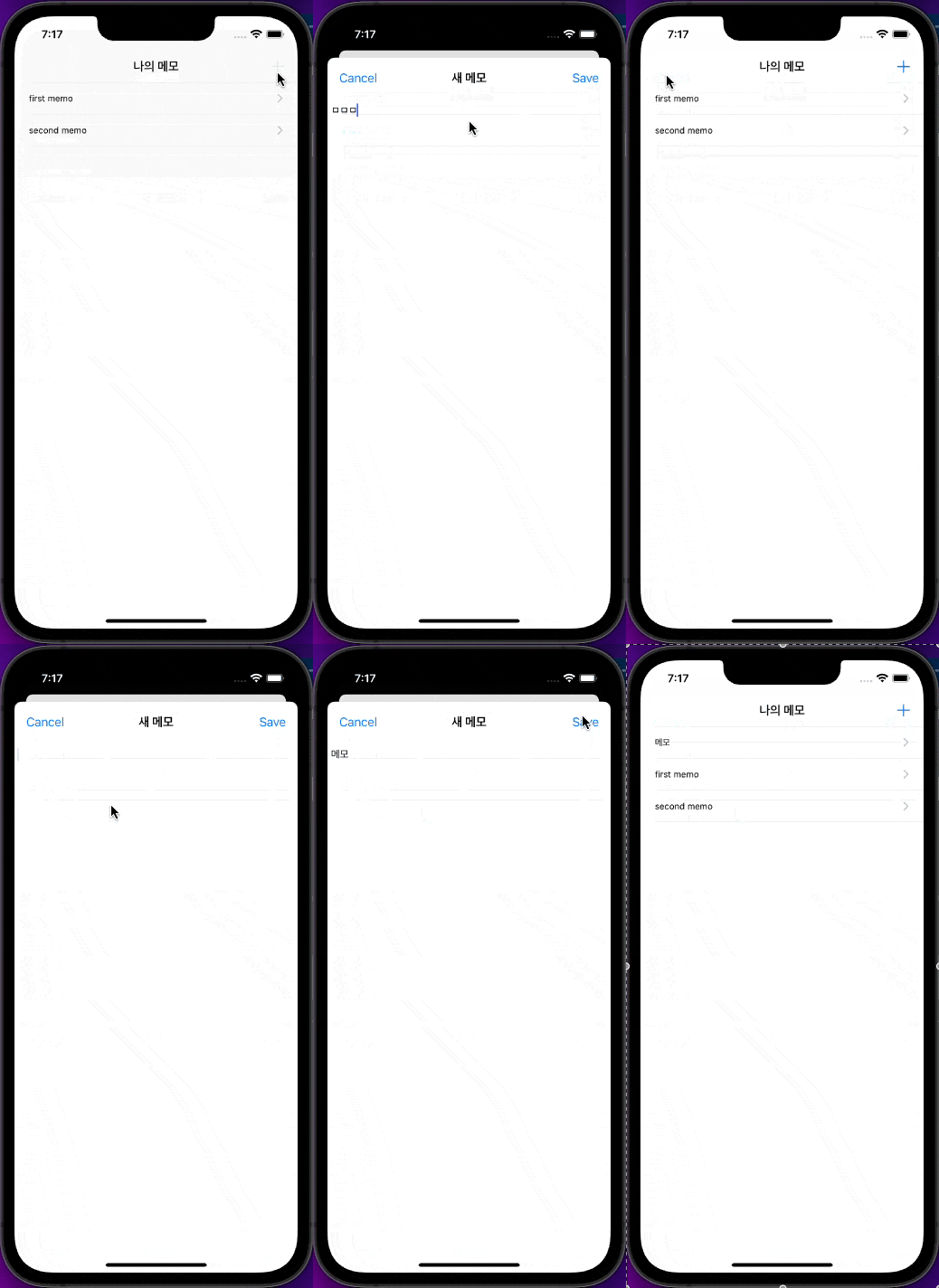
결과 화면
GitHub - camosss/RxSwift: RxSwift 공부한 내용 정리
RxSwift 공부한 내용 정리. Contribute to camosss/RxSwift development by creating an account on GitHub.
github.com
[RxSwift] MVVM-C with Building Memo App (5) 메모 보기 구현
해당 포스팅은 KxCoding RxSwift 강의를 참고한 포스팅입니다! https://www.youtube.com/watch?v=m41N4czHGF4&list=PLziSvys01Oek7ANk4rzOYobnUU_FTu5ns&index=2 #6. 메모 보기 구현 MemoDetailViewModel 첫 번째..
llan.tistory.com
'RxSwift' 카테고리의 다른 글
'RxSwift' Related Articles
more


